
I burned through 176 million Anthropic tokens last Wednesday. You can see the spike in the screenshot further down. Most of that was productive Claude Code work, but when I tracked down the anomaly I found a batch job quietly shovelling raw HTML into Claude Sonnet 4.5 for summarization. The prompts worked; the token budget did not. When I finally looked at what my scraper was feeding the model, roughly 70% of every request was <div class="css-1f2x"> soup. The actual article, the part I cared about, was maybe 25% of the payload.
The fix was a five-line change: convert HTML to Markdown before sending it to the model. Token count dropped by 60%. Same output quality. I wish I had learned this sooner.
This post is about why that works, when it matters, and a few adjacent problems that same trick solves.
Why HTML is a token disaster
LLMs tokenize text. Anthropic exposes a token counting endpoint in the Claude API, and OpenAI's open-source tiktoken gives a similar view: most English prose splits into roughly one token per 3-4 characters. But HTML is not prose. It is a nested tree of tags, class names, inline styles, SVG attributes, and JSON blobs dumped into data-* attributes by every modern framework.
You can verify this yourself. Paste a paragraph of plain text into Anthropic's token counter and note the count. Then wrap it in a typical React-generated <div class="prose dark:prose-invert max-w-none sm:px-6 lg:px-8"> and count again. The wrapper alone, that one line, can cost you 30-40 tokens. Multiply that across a scraped page with 500 nested divs and you see where the money goes.
Markdown, by contrast, is nearly invisible to a tokenizer. A heading is two characters: # . A bold span is four: **x**. A link is [text](url), and the model handles it natively because its training corpus is saturated with Markdown from GitHub, Stack Overflow, and Reddit.
I ran a quick test on the Wikipedia article for the HTTP protocol:
- Raw HTML (saved from browser): ~48,000 tokens
- Cleaned HTML (boilerpipe style): ~22,000 tokens
- Markdown conversion: ~8,900 tokens
That is an 81% reduction against raw, and 60% against even a cleaned HTML payload. On a model that charges per input token, this is not a micro-optimization. It is the difference between a viable product and a Stripe chargeback.
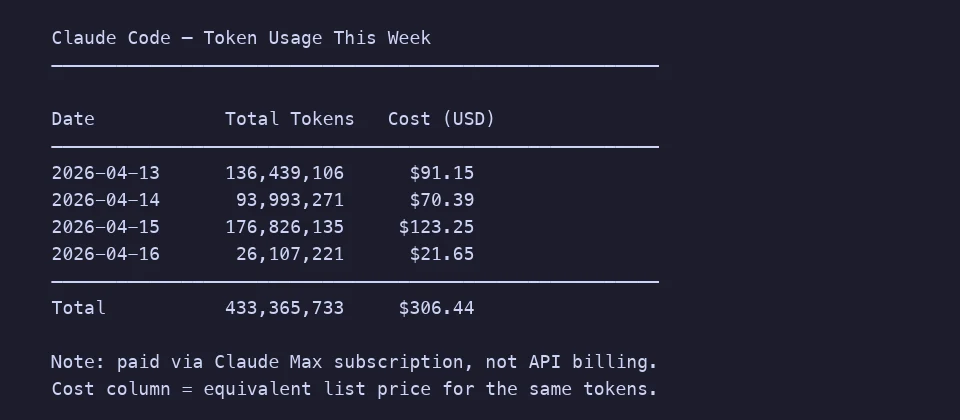
Here is a week of my actual Claude Code usage for reference. Four days, 433 million tokens, about $306 at list prices (I am on a Max subscription, but the equivalent pay-as-you-go cost makes the scale legible). Most of that is productive coding. Imagine what shaving 10-15% off by not shipping structural noise would buy you over a year.
The RAG pipeline case
If you are building retrieval-augmented generation, this matters even more. A RAG system typically:
- Crawls or scrapes source documents
- Chunks them into pieces that fit the embedding model's context window
- Embeds each chunk into a vector database
- At query time, retrieves the top-K chunks and injects them into the LLM prompt
Each of those steps gets worse with HTML in the loop. Embeddings drift because the model is trying to encode CSS class names alongside actual meaning. Chunking gets jagged; you either split mid-tag and confuse the retriever, or you use a naive character split that cuts a sentence in half. Retrieval latency grows because the vector space is polluted with structural noise.
Converting to Markdown before chunking solves all three. The excellent LangChain docs quietly recommend this: use MarkdownHeaderTextSplitter or RecursiveCharacterTextSplitter with Markdown separators. Their own examples strip HTML to Markdown first. There is a reason.
When you cannot run Python on a server
A lot of the HTML-to-Markdown literature assumes you have a backend with BeautifulSoup and markdownify installed. That is fine if you are building a pipeline. It is painful if you are a content writer, a journalist archiving sources, or a developer doing a one-off migration at 11pm.
I built Kitmul HTML to Markdown because I kept reaching for that exact workflow and hating every option. The tool runs in the browser. Paste the HTML source, get the Markdown. Nothing uploads, nothing phones home. The conversion happens with JavaScript on your machine, which means you can paste internal wiki exports, legal drafts, or client content without a second thought.
If you have never inspected the HTML behind a page, open any article, right-click, choose "View Page Source", and copy the article body. Feed that into the tool. What comes back is something you can actually put into a prompt, paste into Notion, or commit to a Git repository.
Seven places this actually helps
It took me a while to recognize how many of my problems reduce to "I have HTML and I wish it were Markdown". A partial list:
Feeding a long article to an LLM. The single largest wins happen when you are summarizing, extracting entities, or asking questions about a long web page. Markdown strips out the chrome and leaves the substance. Prompt cost drops, and ironically the model does better on the cleaner input because it stops getting distracted by CSS.
Migrating a blog off WordPress or Ghost. If you are moving to a static site generator like Astro, Hugo, or Jekyll, every post needs to be a .md file. Export your WordPress XML, feed each <content:encoded> block through the converter, drop the result into content/posts/. I moved 84 posts this way in an evening.
Archiving research. I keep a personal wiki of engineering articles I reference often. Pages disappear from the web all the time; the average web page lifespan is under 100 days. Markdown snapshots take milliseconds to read, diff cleanly in Git, and survive format churn in a way screenshots or PDFs do not.
Preparing training data or few-shot examples. If you are curating examples for fine-tuning or in-context learning, you want them consistent. Markdown is the consistent form. Every scraped source ends up the same shape, with the same heading hierarchy, and no random <span> wrappers confusing your template.
Cleaning up content after visual editors. Tools like Notion, Medium, or CKEditor export HTML that is technically correct but full of <p><strong><em><u> nesting nobody wants. Round-tripping through Markdown collapses that to the minimum semantic form, and you get a diffable, portable source of truth out of it.
Writing documentation from scraped API references. I have done this for three SDKs now. Grab the rendered HTML from the vendor's docs (many are built with MkDocs or Docusaurus and have no Markdown source available), convert it, and you have a starting point you can edit and commit. It is faster than copy-pasting each code block by hand.
Reducing costs on the Claude API and Gemini API. Every frontier model bills input tokens. Anthropic's prompt caching helps, but caching 48K of HTML is still worse than caching 9K of Markdown. Caches also evict. The cheapest token is the one you never send.
What gets lost in the conversion
Be honest about the trade-offs. A few things do not survive:
- Visual styling. Colors, fonts, custom CSS. If the visual layout is the content (infographics, landing pages), Markdown is the wrong target.
- Interactive components. Embedded forms, iframes, JavaScript widgets. These become either plain links or they disappear.
- Exact table layouts. Markdown tables handle rows and columns, but merged cells, colspans, and nested tables simplify or break. For data-heavy tables, CSV export is usually a better path; our CSV to JSON tool covers the adjacent case.
- Image positioning. Markdown images are inline, top-down. Float layouts do not translate.
For 90% of text-driven web pages, none of this matters. For the remaining 10%, you probably want the HTML anyway.
A concrete workflow
Here is the routine I have settled into for LLM work:
- Scrape the page with
fetchor Playwright and grab the innerHTML of the article body, not the full document. A decent CSS selector does half the cleanup for you. - If it is a one-off, paste into the HTML to Markdown converter. If it is a batch, use a library like
turndown(on GitHub) ormarkdownifyin Python. - Strip boilerplate (cookie banners, "related posts", newsletter CTAs). Markdown makes this easy: the noise tends to cluster at the top and bottom.
- Feed to the model. For long documents, chunk along Markdown headings rather than character counts.
- Cache the Markdown version locally. The next run should not repeat step 1.
The whole thing usually takes longer to describe than to run.
The broader point
Format conversion sounds boring. It is, until you watch your API bill shrink by 60% because you stopped sending structural ASCII noise to a trillion-parameter model. LLMs are expensive not in absolute terms but per million tokens, and the number of pipelines where someone is shipping raw HTML into a context window is genuinely embarrassing.
Markdown is the lingua franca of AI training data. That is a fact about the world, not an opinion. Working in Markdown aligns your inputs with what the model was trained to handle, and a plain-text intermediate form also gives you a version your Git history can meaningfully diff, which is something you will be grateful for in six months when you are trying to remember what the prompt looked like in Q3.
Try it
Open the HTML to Markdown converter, paste any HTML, and see the token count drop. Everything runs in your browser, which means your client drafts, scraped sources, and internal docs never leave your machine. The code is inspectable in the DevTools network tab; there are zero outbound requests during conversion.
If you want to publish the Markdown somewhere visual, the Markdown to Medium converter handles publication-ready output for Medium's editor.
Related reading: How to Publish Markdown to Medium Without Losing Formatting · Why Client-Side Tools Are More Private Than the Cloud · AVIF in 2026: The Complete Guide
Related tools: JSON Formatter · CSV to JSON · Word Counter · Text Diff Checker · Image Compressor