Sentiment Analyzer

Analyze toxicity and tone of your text (Insults, Threats, Toxicity, etc).

The Sentiment Analyzer uses local AI model for toxicity classification to deliver powerful analysis directly in your browser. Analyze toxicity and tone of your text (Insults, Threats, Toxicity, etc). All processing happens on your device — text analyzed entirely in your browser. Whether you need quick results or in-depth analysis, this tool provides 7 toxicity categories, sentiment scoring, word detection with zero privacy concerns and no server-side processing.

Analyze Text

Wait a moment, the first time it may take a little while, then it will be fast.
Your data stays in your browser
Was this tool useful?
Tutorial

How to Use Sentiment Analyzer

1
1

Input Your Content

Paste the text or social media comment you want to analyze for tone and toxicity.

2
2

AI Processing

The tool uses local AI models to scan for specific emotional markers and offensive patterns.

3
3

Check Labels

Review the toxicity labels like Insult, Threat, or Obscenity to understand the content depth.

4
4

Analyze Tone

See the overall sentiment score from Very Positive to Very Negative based on word analysis.

Guide

Complete Guide to Sentiment Analysis and Toxicity Detection

What Is Sentiment Analysis and Toxicity Detection?

Sentiment Analysis and Toxicity Detection is the automated process of analyzing text or media using local AI model for toxicity classification. This technology runs entirely in your browser, providing instant results without any server communication. The tool processes your input locally, ensuring complete privacy while delivering professional-grade analysis.

Modern approaches combine statistical methods with machine learning techniques to provide accurate, reliable results that were previously only available through expensive commercial software or manual expert analysis.

Why Sentiment Analysis and Toxicity Detection Matters

Understanding and applying sentiment analysis and toxicity detection is increasingly important in today's digital landscape. Content creators, marketers, educators, and professionals all benefit from automated analysis tools that provide instant, data-driven insights.

By running analysis locally in the browser, you get the benefits of AI-powered tools without sacrificing privacy or paying for cloud-based services. This democratizes access to professional analysis capabilities for everyone.

Key Concepts and Methods

The tool leverages local AI model for toxicity classification to process your input. Key features include 7 toxicity categories, sentiment scoring, word detection. The analysis runs in real-time, updating as you type or modify your input, providing immediate feedback.

The underlying algorithms have been optimized for browser execution using Web Workers and modern JavaScript APIs, ensuring smooth performance without blocking the user interface even with large inputs.

Best Practices and Tips

For optimal results, provide clear, well-structured input. Longer texts generally yield more reliable analysis results, as the algorithms have more data points to work with. Review the output carefully and use the insights to improve your content or workflow.

The tool works best with 7 toxicity categories, sentiment scoring, word detection. Experiment with different inputs to understand how the analysis responds to various content types and styles.


Examples

Worked Examples

Example: Content Moderation

Given: A text or input related to content moderation

1

Step 1: Enter or paste your content into the tool.

2

Step 2: The tool automatically processes and analyzes the input.

3

Step 3: Review the detailed results and insights provided.

Result: Actionable analysis and insights for your content moderation use case.

Example: Brand Monitoring

Given: A text or input related to brand monitoring

1

Step 1: Enter or paste your content into the tool.

2

Step 2: The tool automatically processes and analyzes the input.

3

Step 3: Review the detailed results and insights provided.

Result: Actionable analysis and insights for your brand monitoring use case.

Use Cases

Practical Use Cases

Content Moderation

Automatically flag potentially harmful comments or messages before they reach your community. This is a common use case that many professionals and enthusiasts encounter regularly. The tool processes your input instantly in the browser, providing reliable results without any data leaving your device. Ideal for both quick checks and in-depth analysis workflows.

Brand Monitoring

Analyze customer feedback and reviews to gauge the general sentiment towards your products. This is a common use case that many professionals and enthusiasts encounter regularly. The tool processes your input instantly in the browser, providing reliable results without any data leaving your device. Ideal for both quick checks and in-depth analysis workflows.

Writing Refinement

Check your own emails or articles to ensure the tone is professional and not accidentally aggressive. This is a common use case that many professionals and enthusiasts encounter regularly. The tool processes your input instantly in the browser, providing reliable results without any data leaving your device. Ideal for both quick checks and in-depth analysis workflows.

Frequently Asked Questions

?How does the Sentiment Analyzer work?

The tool uses a local AI model that runs directly in your browser to analyze text for toxicity levels (insults, threats, obscenity, etc.) and overall sentiment tone, ranging from Very Positive to Very Negative.

?Is my text sent to any server for analysis?

No. The AI model is downloaded once and runs entirely in your browser. Your text is never transmitted to any external server, ensuring complete privacy even when analyzing sensitive content.

?What toxicity categories does it detect?

The tool detects seven categories: Identity Attack, Insult, Obscene content, Severe Toxicity, Sexually Explicit content, Threat, and general Toxicity. Each category receives an independent confidence score.

?Why does the first analysis take longer?

On first use, the AI model needs to be downloaded to your browser. This is a one-time process. Subsequent analyses are much faster since the model is cached locally.

?Can I use this for content moderation?

Yes. The Sentiment Analyzer is ideal for pre-screening user-generated content, comments, or messages to flag potentially harmful text before it reaches your community.

?How accurate is the sentiment detection?

The tool uses a well-trained machine learning model that provides reliable results for most text. However, like all AI tools, it may occasionally misinterpret sarcasm, slang, or highly context-dependent language.

?What languages does the analyzer support?

The tool is primarily optimized for English text analysis. Results for other languages may be less accurate since the underlying AI model was trained predominantly on English data.

Help us improve

How do you like this tool?

Every tool on Kitmul is built from real user requests. Your rating and suggestions help us fix bugs, add missing features and build the tools you actually need.

Rate this tool

Tap a star to tell us how useful this tool was for you.

Suggest an improvement or report a bug

Missing a feature? Found a bug? Have an idea? Tell us and we'll look into it.

Related Tools

Recommended Reading

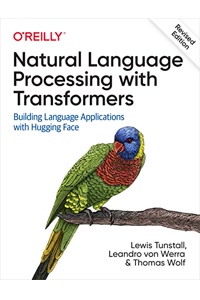
Recommended Books on Natural Language Processing & AI

As an Amazon Associate we earn from qualifying purchases.

Boost Your Capabilities

Professional Products to Boost Your AI Projects

As an Amazon Associate we earn from qualifying purchases.

Newsletter

Get Free Productivity Tips & New Tools First

Join makers and developers who care about privacy. Every issue: new tool drops, productivity hacks, and insider updates — no spam, ever.

Priority access to new tools
Unsubscribe anytime, no questions asked