I spent six years working adjacent to quantum computing research. Not building qubits; building the classical software that talks to the hardware. The thing that surprised me most wasn't the physics. It was how bad the tooling was for anyone trying to learn.
The education gap is the real bottleneck
The hardware is advancing. IBM's 1,121-qubit Condor processor exists. Google's Willow chip hit a below-threshold error correction milestone in late 2024. But ask a CS undergrad to explain what a Hadamard gate actually does to a qubit's state vector, and you'll get a blank stare followed by a memorized sentence from a textbook.
The problem isn't intelligence. The problem is that every learning path for quantum circuits funnels you into one of two dead ends:
1. Pen-and-paper linear algebra. You compute tensor products by hand. You multiply 8x8 matrices. By the time you've verified that your CNOT gate works correctly, you've spent 40 minutes and lost all intuition for what the circuit does.
2. Full SDK installations. Qiskit, Cirq, PennyLane. These are serious tools for serious work. They're also 200MB+ installs with Python dependency chains, Jupyter notebooks, and a learning curve that assumes you already understand what you're trying to learn. That's backwards.
There's a gap between "read the textbook" and "install Qiskit." That gap is where most people give up.
What I actually wanted
A textarea where I type H 0 and immediately see the state vector change. No install. No signup. No notebook server. Just a browser tab. And if I don't remember the syntax, a row of clickable buttons that writes the gate for me.
That's what the Quantum Circuit Simulator is. Up to 16 qubits, nine gates (H, X, Y, Z, S, T, CX, SWAP, CCX), a gate toolbar for quick insertion, real-time probability bars, complex amplitudes, and an interactive 3D Bloch sphere that shows each qubit's state on the unit sphere.
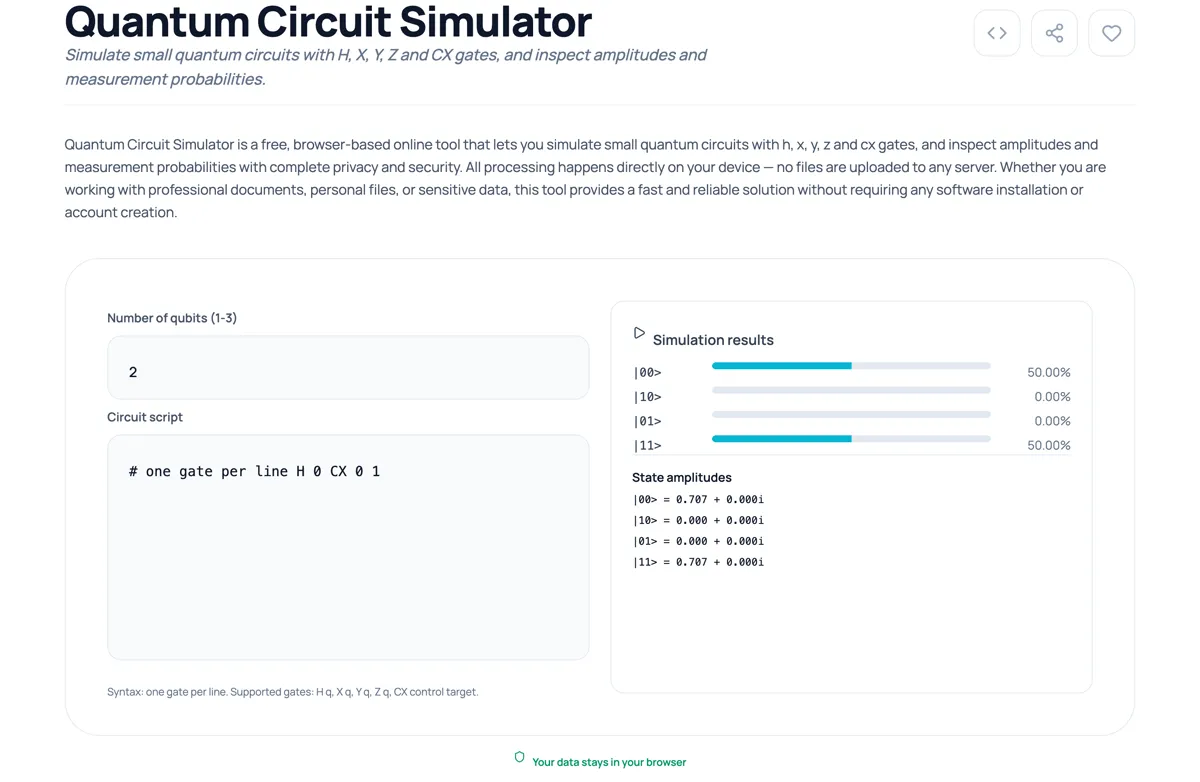
The syntax is one gate per line:
H 0
CX 0 1
That's a Bell State. Two lines. The output shows |00> at 50.00% and |11> at 50.00%, with amplitudes of 0.707 + 0.000i each. If you've read Nielsen & Chuang, you recognize this as (1/sqrt(2))(|00> + |11>); the maximally entangled two-qubit state that Einstein called "spooky action at a distance."
You didn't need to install anything to see that.
Why browser-based matters for quantum education
There's a pedagogical argument here that goes beyond convenience. When the feedback loop between "write circuit" and "see result" drops to zero seconds, something changes in how you learn.
You start experimenting. You add a Z gate after the Hadamard and watch the probabilities shift. You swap the control and target qubits on the CNOT and see what breaks. You build a GHZ state with three qubits:
H 0
CX 0 1
CX 1 2
And you see |000> at 50% and |111> at 50%; all three qubits entangled, no intermediate states. The 0.707 amplitude on both basis states confirms the math. You didn't need to set up a virtual environment to get there.
This is how people actually learn. Not by reading about superposition in a PDF; by breaking circuits and watching what happens.
The technical implementation
The simulator runs entirely in JavaScript. No backend. No WebAssembly. No WASM-compiled Qiskit. Just matrix multiplication on complex numbers in the browser.
The state vector starts as |000...0> (all qubits in the |0> state). Each gate applies a unitary transformation:
- Hadamard (H): Creates superposition. Transforms
|0>into (|0> + |1>)/sqrt(2). - Pauli-X: Quantum NOT gate. Flips
|0>to|1>and vice versa. - Pauli-Y: Rotation around the Y-axis with a phase factor of i.
- Pauli-Z: Phase flip. Leaves
|0>unchanged but maps|1>to -|1>. - CX (CNOT): Controlled-NOT. Flips the target qubit if and only if the control qubit is
|1>. This is the gate that creates entanglement. - Phase (S): Rotates by π/2 around the Z-axis. Maps |1⟩ to i|1⟩. The square root of Z.
- T (π/8 gate): Rotates by π/4 around the Z-axis. Key building block for universal quantum computation. The square root of S.
- SWAP: Exchanges the states of two qubits. Syntax:
SWAP q1 q2. - CCX (Toffoli): Controlled-controlled-NOT. Flips the target qubit only when both control qubits are |1⟩. Universal for classical reversible computation. Syntax:
CCX c1 c2 target.
For a 3-qubit system, the state vector has 2^3 = 8 complex amplitudes. The simulator tracks all of them and displays both the raw amplitudes and the measurement probabilities (|amplitude|^2) in real time.
The circuit state is encoded into the URL. Every change you make; every gate you add, every qubit count adjustment; updates the URL parameters automatically. Copy the URL, send it to a colleague, and they see your exact circuit. No accounts. No save buttons. No cloud storage. The URL is the save file.
The gate toolbar and Bloch sphere
Two things kept bugging me about text-only circuit input. First, beginners don't know the syntax. Second, numbers alone don't build geometric intuition about qubit states.
The gate toolbar sits above the textarea: nine buttons grouped by type (single-qubit: H, X, Y, Z, S, T; two-qubit: CX, SWAP; three-qubit: CCX). Click a button and the gate line gets appended to your circuit. You can still type manually if you prefer, but the buttons remove the "what was the syntax for a Toffoli gate again?" friction.
The Bloch sphere renders below the results panel. It computes the reduced density matrix for each qubit via partial trace, then extracts the Bloch coordinates (x = 2Re(rho01), y = 2Im(rho01), z = rho00 - rho11). For a single qubit in |0>, the vector points to the north pole. Apply a Hadamard and it moves to the equator. Create a Bell state and both vectors collapse to the origin, because the reduced state of each qubit in a maximally entangled pair is the maximally mixed state. You can drag the sphere to rotate it, which helps when multiple qubit vectors overlap.
For circuits with 1 to 4 qubits, all vectors show on the same sphere with different colors. Beyond 4 qubits, a dropdown lets you pick which qubit to visualize.
Comparing to the alternatives
| Feature | Kitmul Simulator | Qiskit | Cirq | IBM Quantum Composer |
|---|---|---|---|---|
| Setup time | 0 seconds | 10-30 min | 10-30 min | Account required |
| Install size | 0 MB | ~500 MB | ~300 MB | Cloud-based |
| Max qubits | 16 | 30+ | 30+ | 127 (hardware) |
| Sharing | URL copy | Export notebook | Export script | Account link |
| Privacy | 100% local | Local | Local | IBM cloud |
| Cost | Free | Free | Free | Free tier limited |
The trade-off is obvious. The Kitmul simulator handles up to 16 qubits. Qiskit handles 30. If you're implementing Shor's algorithm or running variational quantum eigensolvers, you need the full SDK. If you're trying to understand what a Hadamard gate does before committing to a 500MB install, you don't.
Eight circuits worth trying
Here are eight circuits you can paste directly into the simulator (or build them by clicking the gate buttons):
1. Superposition on a single qubit (set qubits to 1):
H 0
Result: |0> and |1> each at 50%. This is the quantum coin flip.
2. Bell State (set qubits to 2):
H 0
CX 0 1
Result: |00> and |11> each at 50%. Maximal entanglement.
3. GHZ State (set qubits to 3):
H 0
CX 0 1
CX 1 2
Result: |000> and |111> each at 50%. Three-qubit entanglement.
4. Phase kickback (set qubits to 2):
X 1
H 0
CX 0 1
H 0
Result: The Hadamard-CNOT-Hadamard sandwich. Watch how the phase of the target qubit kicks back to the control. This is the core mechanism behind Deutsch's algorithm.
5. Quantum NOT with Hadamard (set qubits to 1):
H 0
Z 0
H 0
Result: |1> at 100%. The H-Z-H sequence is equivalent to a Pauli-X gate. This identity (HZH = X) shows up everywhere in quantum error correction.
6. Phase gate demo (set qubits to 1):
X 0
S 0
Result: |1> at 100%, but the amplitude is now 0.000 + 1.000i. The S gate adds a π/2 phase rotation. Compare with Z (which maps |1⟩ to -|1⟩).
7. Toffoli gate — quantum AND (set qubits to 3):
X 0
X 1
CCX 0 1 2
Result: |111> at 100%. The Toffoli gate flips qubit 2 only when both qubits 0 and 1 are |1>. This is the reversible equivalent of a classical AND gate.
8. SWAP circuit (set qubits to 2):
X 0
SWAP 0 1
Result: |01> at 100%. The state that was on qubit 0 has been transferred to qubit 1.
Who this is for
CS students taking their first quantum computing course. The simulator covers exactly what shows up in chapters 1-4 of Nielsen & Chuang; single-qubit gates, multi-qubit gates, entanglement, and measurement probabilities. The gate toolbar means you don't need to memorize syntax on day one, and the Bloch sphere gives you the geometric picture that textbooks struggle to convey in static figures.
Software engineers curious about quantum computing but not ready to commit to a full SDK installation. You can verify your intuition in 30 seconds and then decide if it's worth going deeper with Qiskit or Cirq.
Physics students who understand the math but want to quickly prototype small circuits without booting up Jupyter.
Teachers who need a zero-friction demo tool for lectures. Share a URL; students see the circuit on their own devices. No lab setup. No installation instructions. No "my Python version is different" support tickets.
Privacy
The entire simulation runs in your browser's JavaScript engine. No circuit data is transmitted to any server. No analytics track which gates you use. The URL encoding uses base64, which is decoded client-side. If you're working with proprietary circuit designs (up to 16 qubits), nothing leaves your device.
If you want to explore other tools in the same category, the Visualizers & Logic Tools collection includes graph visualizers, truth tables, and logic gate simulators that pair well with quantum circuit work. For tracking your study sessions, the Pomodoro Timer with built-in focus music works surprisingly well for problem sets.
The point
Quantum computing doesn't need to be gatekept by tooling complexity. The fundamental operations; Hadamard, Pauli gates, CNOT; are matrix multiplications. A browser can do matrix multiplication. So a browser can simulate small quantum circuits. And with a clickable gate toolbar and an interactive Bloch sphere, the barrier to entry drops even further.
The Quantum Circuit Simulator won't replace Qiskit for research. It replaces the 30 minutes between "I wonder what happens if I apply H then CX" and actually seeing the answer. For learning, that's everything.
The Quantum Circuit Simulator is free, private, and runs entirely in your browser. No signup, no install, no data leaves your device. Part of the Visualizers & Logic Tools collection on Kitmul. Photos by Alex Shuper and Dynamic Wang on Unsplash.