Resume Builder

Create professional, ATS-friendly resumes with multiple templates. Download as PDF instantly.

Resume Builder is a free, browser-based tool that creates professional, ATS-friendly resumes with 5 beautiful templates. Download as PDF instantly. Choose from Classic, Modern, Professional, Minimal, or Executive designs. All processing happens directly on your device; no files are uploaded to any server. Whether you are a seasoned professional, recent graduate, or career changer, this tool provides a fast and reliable way to create polished resumes without requiring any software installation or account creation.

Your data stays in your browser
Was this tool useful?
Tutorial

How to use

1
1

Choose a Template

Select from 5 professional templates: Classic (traditional layout), Modern (clean with accent colors), Professional (bold header block), Minimal (simple and elegant), or Executive (senior-level design).

2
2

Fill in Your Details

Enter your personal information, professional summary, work experience, education, skills, and any additional sections like certifications, languages, or projects.

3
3

Add Work Experience

Add your work history with bullet points for each role. Use action verbs and quantify achievements where possible. Add multiple positions with the Add Experience button.

4
4

Preview and Download

Review your resume in the live preview panel. When satisfied, click Download PDF to get your resume as a professionally formatted, ATS-friendly PDF file.

Guide

Complete Guide to Resume Builder

What is Resume Builder?

Resume Builder is a specialized online tool designed to help you create professional, ATS-friendly resumes with multiple templates and download them as PDF instantly. It runs entirely in your browser, which means no software installation is required and your data never leaves your device.

This tool is essential for job seekers at every career stage who need polished, professionally formatted resumes without relying on expensive resume-building services or subscriptions. The browser-based approach ensures compatibility across all operating systems and devices.

By processing everything locally, the tool guarantees that your personal information and resume content remain completely private and secure throughout the entire process.

Why ATS-Friendly Resumes Matter

Over 75% of resumes are rejected by applicant tracking systems before a human ever sees them. ATS software scans resumes for keywords, formatting, and structure to filter candidates. A beautifully designed resume that uses images, tables, or unusual fonts may be unreadable to these systems.

All five templates in this tool are specifically designed with ATS compatibility in mind. They use real text (not images), standard fonts, clean heading structure, and simple layouts that parse correctly in every major ATS platform.

The result is a resume that looks professional to human readers while being fully machine-readable, giving you the best chance of passing automated screening and reaching the interview stage.

Best Practices for Resume Writing

Keep your resume concise; one to two pages is ideal for most professionals. Lead with a strong professional summary that communicates your value proposition in 2-3 sentences. Use bullet points with action verbs and quantify achievements wherever possible.

Tailor your resume for each application by incorporating keywords from the job description. Prioritize recent and relevant experience. Include a skills section that lists both technical and soft skills relevant to your target role.

Proofread carefully before downloading. Use the live preview to check formatting, spacing, and overall visual balance. A well-structured resume with clear sections makes it easy for both ATS systems and hiring managers to find the information they need.
Examples

Worked Examples

Example: Mid-Career Professional Resume

Given: A marketing manager with 8 years of experience applying for a senior marketing director role.

1

Step 1: Select the 'Professional' template for a bold, confident impression.

2

Step 2: Enter personal info: name, job title, email, phone, location, and LinkedIn URL.

3

Step 3: Write a professional summary highlighting leadership experience and key achievements.

4

Step 4: Add 3 work experience entries with quantified bullet points (e.g. 'Increased lead generation by 45%').

5

Step 5: Add education, skills (SEO, Analytics, Team Leadership), and certifications (Google Analytics, HubSpot).

6

Step 6: Review in live preview and click Download PDF.

Result: A professionally formatted, ATS-friendly two-page resume in PDF format, ready to submit to job applications.

Example: Recent Graduate Resume

Given: A computer science graduate with internship experience applying for entry-level software developer roles.

1

Step 1: Select the 'Modern' template for a clean, contemporary look.

2

Step 2: Enter personal info including portfolio website and GitHub profile.

3

Step 3: Write a summary focusing on technical skills and eagerness to contribute.

4

Step 4: Add internship experience with bullet points describing projects and contributions.

5

Step 5: Add education (with GPA if strong), skills (Python, React, SQL), and projects section with 2-3 personal projects.

6

Step 6: Preview and download as PDF.

Result: A clean one-page resume that emphasizes skills and projects, optimized for ATS screening at tech companies.

Use Cases

Use cases

Career Professional Resume

Build a polished resume for mid-career professionals. Use the Professional or Executive template to showcase extensive work history, achievements, and leadership experience. Add certifications and skills sections to highlight specialized qualifications. Everything is processed locally for complete privacy.

Entry-Level / Recent Graduate Resume

Create a strong resume for recent graduates or career starters. The Modern or Minimal template keeps the focus on education, internships, projects, and relevant skills. Emphasize coursework, volunteer work, and transferable skills. No account or sign-up needed.

Career Change Resume

Craft a resume for career transitions that emphasizes transferable skills and relevant experience. Use the professional summary to frame your career pivot, and organize sections to highlight the most relevant qualifications for your target role. Download instantly as a clean PDF.

Technical / IT Resume

Build a skills-focused resume for technical roles. Use the skills section to list programming languages, frameworks, and tools. Add a projects section to showcase hands-on experience. All templates are ATS-friendly for automated screening systems.

Frequently Asked Questions

?Is this resume builder free?

Yes. Completely free with no limits, no sign-up, and no watermarks on your downloaded PDFs.

?Is my data private?

Yes. Everything runs locally in your browser. No personal data, text, or files are sent to any server. Your resume content never leaves your device.

?Are the resumes ATS-friendly?

Yes. All templates use real text (not images), standard fonts, and clean structure specifically designed for maximum compatibility with applicant tracking systems (ATS). No tables, text boxes, or graphics that could confuse ATS parsers.

?What templates are available?

Five professional templates: Classic (traditional two-column), Modern (clean with accent colors), Professional (bold colored header), Minimal (simple and elegant), and Executive (designed for senior-level professionals).

?Can I add multiple work experiences?

Yes. Click 'Add Experience' to add as many positions as you need. Each entry supports multiple bullet points describing your achievements and responsibilities.

?What sections can I include?

The resume builder supports personal information, professional summary, work experience, education, skills, certifications, languages, and projects. Use the Add Section button to include optional sections.

?What format is the output?

The tool generates a standard PDF file using US Letter size (8.5 x 11 inches) with professional margins, compatible with any PDF reader, printer, or online application portal.

?Does this use AI to write my resume?

No. This tool formats your own content into a professional layout. You write the text, and the tool handles the design, structure, and PDF generation. This ensures your resume is authentically yours.

Help us improve

How do you like this tool?

Every tool on Kitmul is built from real user requests. Your rating and suggestions help us fix bugs, add missing features and build the tools you actually need.

Rate this tool

Tap a star to tell us how useful this tool was for you.

Suggest an improvement or report a bug

Missing a feature? Found a bug? Have an idea? Tell us and we'll look into it.

Related Tools

Recommended Reading

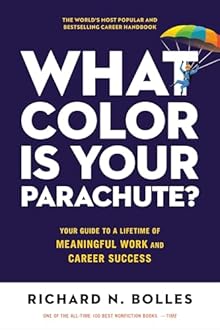
Recommended Books on Resumes & Career Development

As an Amazon Associate we earn from qualifying purchases.

Boost Your Capabilities

Professional Products to Boost Your Career

As an Amazon Associate we earn from qualifying purchases.

Newsletter

Get Free Productivity Tips & New Tools First

Join makers and developers who care about privacy. Every issue: new tool drops, productivity hacks, and insider updates — no spam, ever.

Priority access to new tools
Unsubscribe anytime, no questions asked