In 2018 I wrote my first blog post about TensorFlow.js. I was running PoseNet in a browser tab; real-time human pose estimation with zero server infrastructure. The idea felt radical at the time. People asked why I wasn't using a proper GPU server. My answer was the same then as now: because the browser is enough, and it costs nothing.
Eight years later, the same principle applies to object detection. I've never run YOLO from a server. Not once. The entire premise of shipping user images to someone else's GPU never made sense to me when WebGL was right there, already inside every laptop.
The argument I've been making since 2018
Back in that TensorFlow.js post, I wrote something that still holds:
Before TensorFlow.js, it was impossible to use machine learning models directly in the browser without an API interaction. Now we can train and use models offline. Predictions are much faster because they don't require the request to the server. Another benefit is the low cost in server because now all these calculations are on client-side.
Three benefits. They haven't changed:
1. Zero server cost. Every model inference that runs on the user's device is one you don't pay for. I built a cat/dog image classifier, a text toxicity detector, PoseNet demos; all running entirely in the browser. My AWS bill for ML inference has been zero for eight years because I never started one.
2. Offline predictions. The model downloads once, gets cached by the browser, and works forever without a network connection. Try that with a cloud API.
3. Privacy by architecture. When there's no server, there's nothing to trust. The user's data stays on their device because there's physically nowhere else for it to go. This isn't a policy choice; it's a structural guarantee.
Why the industry went the other way
Most companies chose the server path anyway. The reasons were practical at the time: WebGL was immature, Wasm didn't exist yet, models were too large for browser delivery. The industry converged on a pattern; upload image, run inference on GPU, return JSON.
That pattern created problems people still deal with today:
Privacy is a legal liability. Your image hits a server, gets logged, maybe stored for "model improvement." GDPR and CCPA exist precisely because this architecture leaks user data by default. Every image sent to a detection API is a liability under GDPR Article 9.
Latency adds up. Upload 2MB, wait for inference, download results. On a good connection: 800ms-2s. On mobile: timeout. The Google Web Vitals research shows users abandon tasks after 3 seconds. Server-round-trip detection barely fits.
Cost scales linearly. A thousand detections through a cloud API means a bill. This makes prototyping expensive and kills experimentation; the exact opposite of what I wanted back in 2018 when I was just trying to get PoseNet working on a webcam.
What matured: WebAssembly caught up to WebGL
In 2018, browser ML was limited. TensorFlow.js used WebGL for GPU access, but the ecosystem was small and models were basic. Since then:
WebAssembly reached near-native execution speed. The ONNX Runtime team shipped a Wasm backend that runs full neural network graphs in the browser. This means models that don't need GPU (or run on devices with weak GPUs) can still execute at acceptable speeds.
WebGL matured significantly, and WebGPU is now landing in browsers with proper compute shader support. Matrix multiplications that took seconds on CPU in 2018 now finish in milliseconds on integrated GPUs.
The model ecosystem exploded. In 2018 I had PoseNet and MobileNet. Today you can run YOLO, Whisper, Stable Diffusion, LLMs; all client-side. The ONNX model zoo has hundreds of production-ready models optimized for browser inference.
The thesis from 2018 was right. It just needed the tooling to catch up.
How YOLO works (and why it's ideal for browser inference)
YOLO ("You Only Look Once") is architecturally perfect for client-side use because it processes the entire image in a single forward pass. Traditional detectors like R-CNN ran two stages; propose regions, then classify each. Slow and sequential. YOLO does everything at once:
- Divide the image into an S x S grid
- Each cell predicts bounding boxes + confidence + class probabilities simultaneously
- Non-maximum suppression removes duplicates
- Output: objects with coordinates, labels, and confidence scores
The original 2016 paper by Redmon et al. hit 45 FPS. The architecture has evolved through YOLOv5, YOLOv8 and beyond. The model detects 80 object categories from the COCO dataset: people, vehicles, animals, furniture, electronics, food.
Single-pass inference means predictable latency. No iterative region proposals, no variable compute. One image in, one set of detections out. That predictability is what makes it viable in a browser where you can't assume a 3090 is waiting.
Privacy isn't a feature; it's the absence of a server
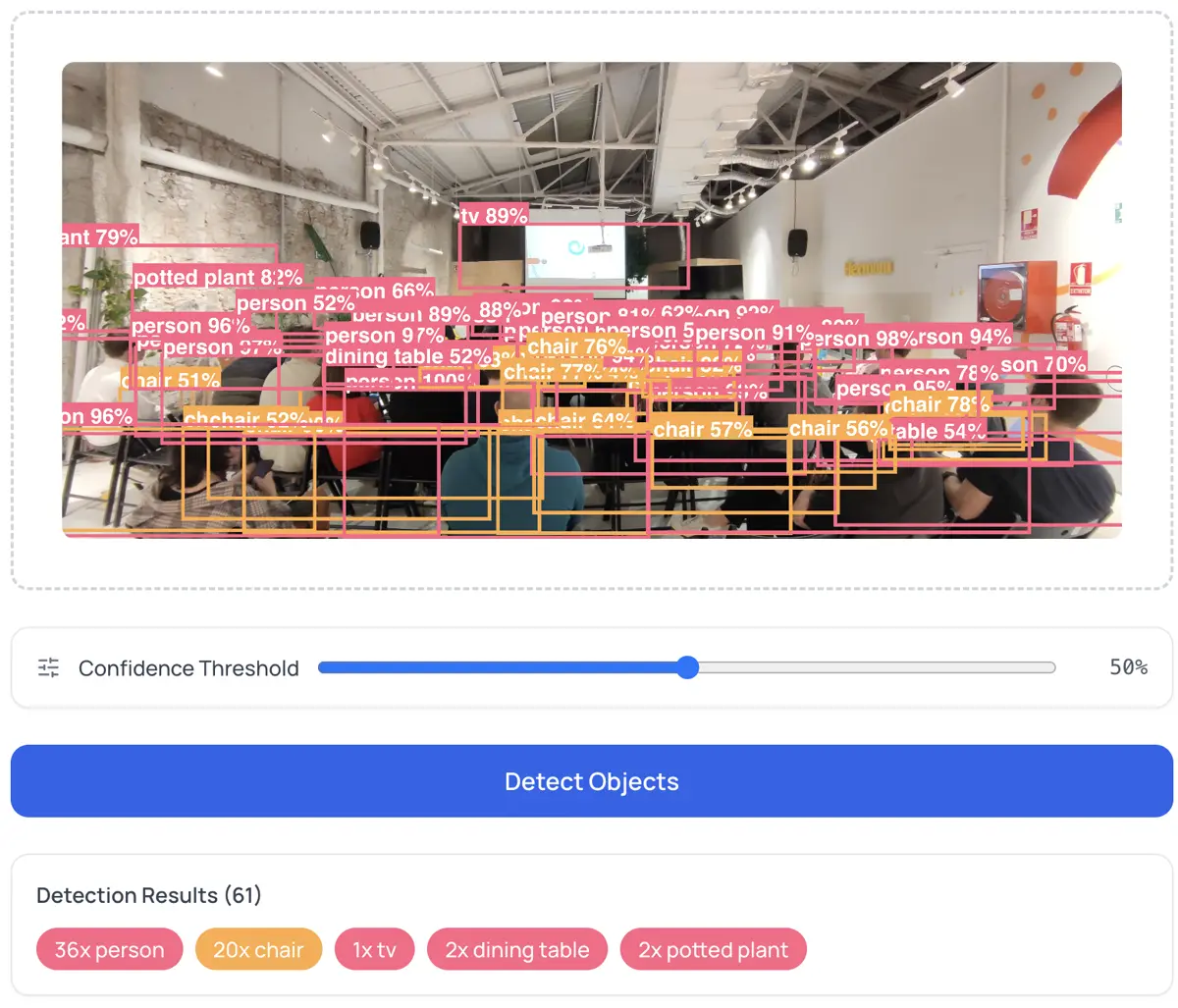
I keep coming back to this because it's the core of why I build things this way. When I say "runs in your browser," I mean: open DevTools, go to the Network tab, run a detection. Zero outbound requests after the initial model download. Your image stays in browser memory, gets processed by the GPU, and results render on a canvas element.
This matters for cases where server-side processing is either illegal or insane:
- Medical imaging. Hospitals can't send patient scans to random APIs. HIPAA violations start at $100 per record.
- Surveillance footage. Sending camera feeds to cloud services is a legal minefield in most EU jurisdictions.
- Personal photos. People don't want their family pictures on someone else's computer. The fact that this needs to be said is the problem.
With browser-based detection, the question of trust is irrelevant. There's no server to trust.
What you can do with it
Count objects. Upload a parking lot photo and get a vehicle count. Warehouse shelf; count boxes. Event photo; count people. No code, no setup.
Prototype computer vision pipelines. Before writing Python, test how YOLO performs on your specific images. Export JSON detections and feed them into your pipeline. The Object Detector lets you adjust confidence thresholds and export both annotated PNGs and structured JSON.
Generate accessibility metadata. Run detection on product images to produce descriptive alt text. "Image contains: 2 people, 1 laptop, 1 coffee cup" beats an empty alt attribute. The W3C Web Accessibility Initiative recommends this for all informative images.
Quality control from a tablet. Manufacturing teams can run defect detection on product photos in a browser. No dedicated hardware. No cloud dependency.
The confidence threshold
Every detection has a score between 0 and 1. The threshold controls what you see:
- 0.3: More detections, more noise. Good for exploring what the model finds.
- 0.7: Fewer detections, high precision. Good for production use.
- 0.5: Reasonable balance for most cases.
This is the precision-vs-recall trade-off. Stanford's CS231n explains the mAP framework for evaluating detectors in detail.
Honest limitations
Browser inference isn't a replacement for everything. The constraints:
Speed. A dedicated GPU runs YOLOv8 in 5-10ms. A browser takes 100-500ms per image. Fine for single images; too slow for real-time 30 FPS video.
Model size. YOLO weights are 20-50MB. First load requires downloading them. After that, browser cache handles it.
Fixed categories. The COCO model knows 80 classes. Custom objects (specific machine parts, rare species) need fine-tuned models. You can bring your own ONNX model, but training still requires a GPU elsewhere.
Mobile. Phones have weaker GPUs. Expect 2-3 seconds per detection on mid-range hardware.
None of this is a dealbreaker for the core use case: quick, private, zero-cost object detection.
Full circle
In 2018 I wrote "the low cost in server because now all these calculations are on client-side." That sentence still describes exactly what the Object Detector does. Load a YOLO model in the browser, upload an image, get detections. No sign-up, no API key, no upload to anyone's server.
The technology matured. The principle never changed.
Runs on ONNX Runtime Web, trained on COCO (80 categories). Architecture: YOLO by Ultralytics. If you want to understand the foundations, start with my 2018 TensorFlow.js post.