What Is User Story Mapping?
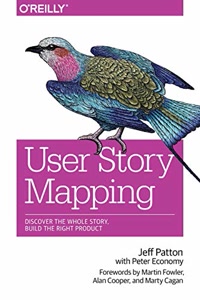
User Story Mapping is an agile product planning technique created by Jeff Patton and detailed in his book 'User Story Mapping: Discover the Whole Story, Build the Right Product.' The technique arranges user stories in a two-dimensional grid where the horizontal axis represents the user journey (the sequence of activities and tasks a user performs) and the vertical axis represents priority or release order.
The top row of the map shows high-level user activities — the major goals users want to accomplish. Below each activity are the specific tasks users perform to achieve that goal. Under each task, individual user stories describe the features or functionality that support the task. Stories closer to the top are higher priority and ship in earlier releases.
This visual arrangement gives the entire team — developers, designers, product managers, and stakeholders — a shared understanding of the product scope, user journey, and release strategy. Unlike a flat backlog, a story map preserves the narrative context that helps teams make better prioritization decisions.
Why User Story Mapping Beats a Flat Backlog
Traditional product backlogs are flat lists of user stories prioritized from top to bottom. While simple, this format loses critical context: how stories relate to each other, which stories together form a complete user experience, and what the minimum viable product looks like.
User Story Mapping solves these problems by adding a second dimension. By seeing stories arranged along the user journey, teams can identify gaps in the experience (missing stories), redundancies (overlapping stories), and natural release boundaries. The horizontal flow makes it obvious when an entire user activity is missing from the plan.
The visual format also makes stakeholder conversations more productive. Instead of debating individual story priorities in isolation, teams can draw a horizontal line across the map to define a release boundary and ask: 'Does everything above this line create a complete, usable experience?' This MVP-defining exercise is one of the most valuable outcomes of story mapping workshops.
How to Create Your First User Story Map
Start by identifying the primary persona whose journey you are mapping. Write their name at the top of the canvas. Then brainstorm the major activities they perform with your product — these become the top-level cards arranged left to right in roughly chronological order.
Under each activity, add the specific tasks the user performs. For an e-commerce site, the 'Purchase' activity might include tasks like 'Browse products,' 'Add to cart,' 'Enter shipping info,' and 'Complete payment.' Under each task, add user stories that describe specific features supporting that task.
Once all stories are placed, define your releases using the release counter. Click on stories to assign them to releases using color codes. Stories in Release 1 (the first color) represent your MVP — the minimum set of features that creates a complete, valuable user experience. Later releases add depth and polish to each activity.